


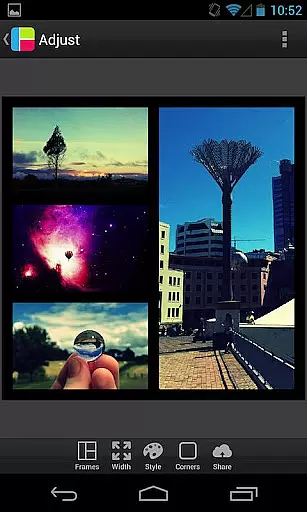
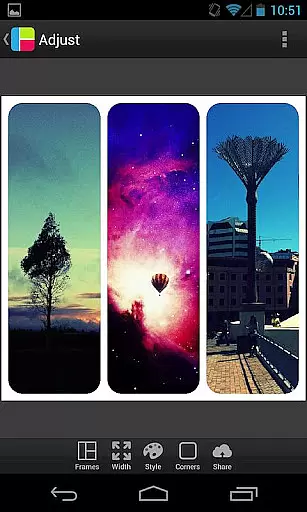

PicFrame is a photography app designed to help users create stunning photo collages with ease. This mobile app offers a variety of layout options and customization tools, allowing users to combine multiple images into one cohesive frame. The app's intuitive interface ensures that even beginners can achieve professional-looking results.
The primary purpose of PicFrame is to enhance the app experience by providing creative solutions for photo editing. With features like adjustable borders, filters, and text overlays, this Android app caters to those who wish to express their creativity through digital art. Users can save and share their creations directly from the app, making it a versatile tool for social media enthusiasts.
PicFrame is ideal for individuals who enjoy expressing creativity through photography. It appeals to a wide audience, including teenagers, young adults, and professionals seeking an app-based solution for designing social media content. Those with minimal editing experience will find its user-friendly interface particularly helpful.
This app is commonly used for creating visually appealing posts on platforms like Instagram or Pinterest. It also serves as a handy tool for event photographers who need quick edits on the go. Whether planning a personal project or enhancing marketing materials, PicFrame provides the flexibility needed to produce engaging visuals.
PicFrame stands out due to its seamless combination of powerful editing tools and ease of use. The app experience is enhanced by features that cater to both casual users and those with more advanced needs. Its ability to produce high-quality collages quickly makes it a valuable asset for anyone involved in visual storytelling.
What sets PicFrame apart from similar apps is its focus on customization. Users can tailor every aspect of their collages, ensuring that each creation reflects their personal style. Additionally, frequent updates and responsive customer support make this app a reliable choice for consistent quality and performance.
Easy-to-use interface
Variety of layout options
High-resolution output
Regular feature updates
Strong user support
Limited free templates
Ads in the free version
Advanced tools require purchase
Occasional slow loading
Learning curve for beginners

How old age camera Gender Swap App Face Shape Hairstyle App Hair Styler App fun!
 4.00
4.00
Take videos and pictures with the popular TikTok TIME WARP SCAN filter.
4.60
Automatically backup your photos and videos to computer, NAS and Cloud services
4.60
USB Storage Access for Photos, Videos, Music and Documents
3.80
Fit multiple photos on one post. Create carousels & scroll layouts for Instagram
4.50
Hair color changer, AI haircut app, fun hair editor and buzz cut filter for all!
3.80
Astrophotography with your smartphone, photo live stacking and much more!
3.90
Welcome to ProShot, the most powerful camera app on Android.
4.20
Photo & Video Gallery app to manage albums and save WA Status easily.
4.70
Amazing Photo Effects - The most fun you can have with your photos!
4.70
See your baby AI baby face generator AI baby maker Face generator babymaker fun!
4.70
Easily stitch panoramas from multiple photos or video.
4.40
RAW video capture with advanced controls
4.40
AI portrait generator and polaroid AI selfie, fun AI generated AI photo creator!
4.30
Shooting photos and records video easily and efficient with professional Camera
4.30
All-in-One Editor & AI Photo Enhancer, Collage, Cartoonify, Funny Stickers & BGS
4.10
Catch sunlight, sunrise sunset times and sun phases with the AR sun tracker.
4.10
Photobooth mini FULL app will allow you to add more fun to your parties
4.00
Pet Camera
3.70


User Reviews