
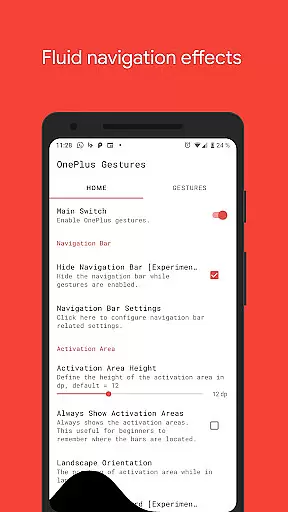
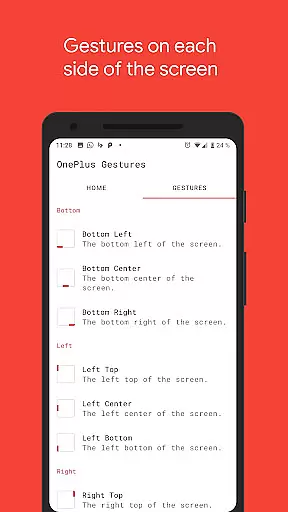
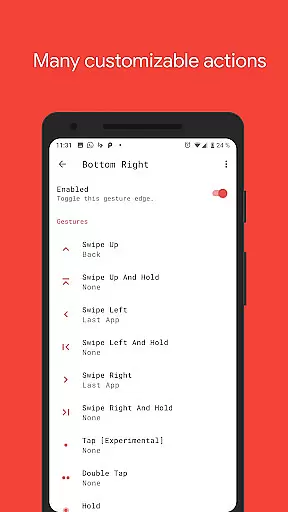
Vivid Navigation Gestures is a mobile app designed to enhance the Android navigation experience by introducing customizable gestures. This tool allows users to replace traditional button-based navigation with intuitive swipes and gestures, providing a modern and seamless way to interact with their devices. The app focuses on simplicity and functionality, ensuring that even those unfamiliar with gesture controls can adapt quickly.
The primary purpose of Vivid Navigation Gestures is to streamline device interaction by offering a highly customizable gesture-based system. Users can define specific actions for various swipe motions, such as going back, opening recent apps, or returning to the home screen. With its lightweight design and minimal resource usage, this Android app ensures a smooth app experience without compromising device performance.
This app is ideal for Android users seeking a more modern and efficient way to navigate their devices. It appeals particularly to younger tech-savvy individuals who prefer gesture-based controls over traditional buttons. Additionally, users who value customization in their mobile app experience will find Vivid Navigation Gestures especially appealing.
Practical use cases include situations where users want to maximize screen real estate by eliminating navigation bars. For example, gamers and multimedia enthusiasts often prefer gesture controls to reduce clutter. Similarly, professionals using their devices for productivity can benefit from faster and smoother navigation through this app-based solution.
Vivid Navigation Gestures stands out due to its combination of simplicity and powerful functionality. By replacing physical or on-screen buttons with fluid gestures, it offers an innovative way to interact with Android devices. The app's customization options ensure that users can tailor the experience to their preferences, enhancing overall usability. Furthermore, its lightweight nature guarantees minimal impact on device performance.
What makes this app unique is its ability to cater to both casual and advanced users. While beginners can use pre-configured gesture settings, advanced users can fine-tune every aspect of navigation. Compared to alternative solutions, Vivid Navigation Gestures provides a more polished and reliable experience, making it a top choice for anyone looking to upgrade their navigation system.
Easy to set up
Highly customizable
Lightweight and fast
Regular feature updates
Intuitive user interface
Limited to Android
Requires initial learning
No tablet optimization
Occasional bugs
Premium version needed

 4.50
4.50
PDF Reader - Document Viewer: Read, Manage & Organize Your Documents
3.10
HD Video player and downloader for all formats, fast & smooth 4K video playback.
4.60
Carry a FTP server in your pocket and avoid USB cables for file transfer
4.20
App to pay for FUTO Keyboard
4.60
With videos, electrical calculators, and built-in ebook, Ugly’s has your answer.
4.50
A simple app to back up and restore SMS & MMS messages and call logs.
4.10
Pro Emulator is an easy to use game console emulator for a range of consoles.
4.40
Mobile Security with Scam Protection | Malware & Virus Cleaner | Safe Browser
4.70
Support Fossify apps with a warm thank you!
5.00
Monitor car performance in real time and troubleshoot malfunctions.
4.80
Unit and currency converter with easy and simple UI.
4.80
Protect your device with antivirus, storage cleanup, and system monitoring
4.70
Canon PRINT is a companion app for your Canon printer.
4.60
pdf merge, word to pdf, jpg to pdf, edit pdf, convert to pdf and much more!
4.20
Signal Strength, Mobile, Wifi, Speed Test, Bad Signals, Cellular, 5G, LTE, 4G
4.20
Family Locator, Share location, StayConnect with your family in real time
3.90
Create your own custom widget with endless possibilities
3.90
Unlock your Essential Key. Create custom shortcuts to your favorite apps!
4.0


User Reviews